AI Native DAW

Compose and arrange,
by prompt.

OmniComposer is a DAW with powerful AI assistance for Windows and macOS. Compose, arrange, edit MIDI, configure instruments, and export in one workspace.
Compose and arrange by prompt Built-in templates Full MIDI control VST instruments and export Subscription
01Shape the songDescribe genre, purpose, length, and instruments to generate a MIDI draft. 02Fix the notes you care aboutEdit pitch, length, timing, and velocity. 03Keep alternatives in tabsSplit song ideas and alternate arrangements into tabs and compare by ear. 04Play it with your soundFinish generated MIDI with your own instruments and effects.
Workspace

From composition to export, all in one screen.

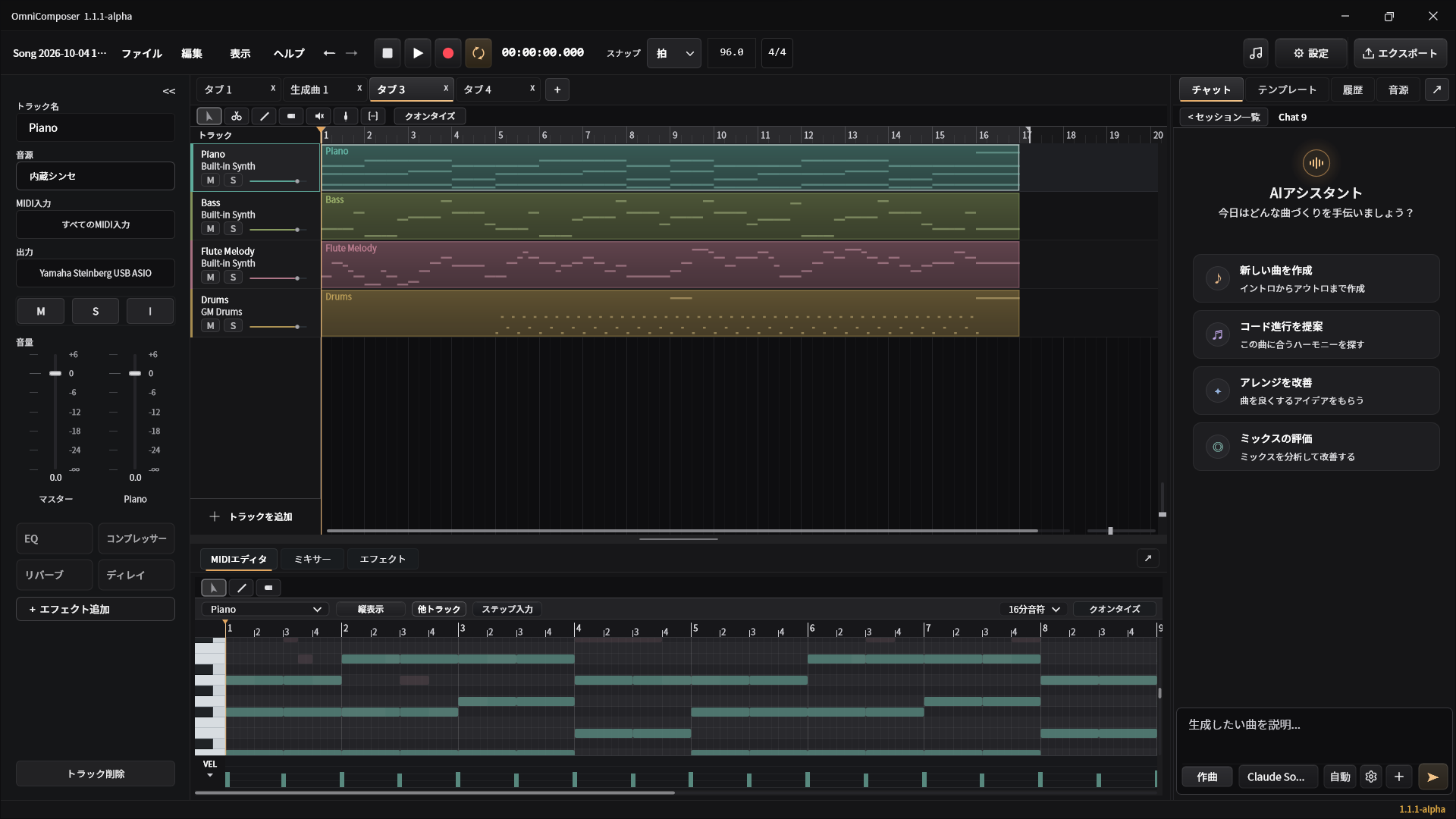
OmniComposer workspace with track list, MIDI editor, and AI assistant panel
Tracks and clips MIDI editing in the piano roll AI assistant and generation candidates View feature details
Positioning

Clean sound without the noise typical of AI-generated audio.

Unlike conventional AI music services that render finished audio, OmniComposer uses an LLM to compose as MIDI data. Because it does not generate audio directly, you avoid the noise and quality degradation common in AI-rendered tracks. Sound comes from the instruments you choose, and every note remains editable.

Production Loop

Compose by prompt. Fix notes in the piano roll. Add tracks or export by prompt. Play through your instruments and export to MIDI/WAV.

See the workspace

Who It Is For

For anyone who needs game BGM, video BGM, practice material, or rough sketches fast.

You can start without composition knowledge or instrument experience. Describe your idea in words to get a draft; if you have experience, refine it further in the MIDI editor. Write only the melody yourself and let AI handle the accompaniment, or have AI continue a song you started halfway.

01

Composition

Build the song skeleton with melody, chords, bass, and drums.

02

Arrangement

Compare different structures, densities, and verse/chorus variations.

03

Finishing

Connect MIDI editing, instrument choice, effects, and export.

Getting Started

You do not need to play piano to compose.

OmniComposer is not software only for skilled instrumentalists. Even if you want to write music but cannot play an instrument, describing mood and purpose in words gives you a draft with melody, chords, bass, and drums.

You do not have to perform every note yourself from the start. AI creates the MIDI draft, and you refine it in the piano roll until it becomes your song.

Good fit if you

No instrument experience but want to try composing. Starting DTM but unsure where to begin. Need BGM for games or video projects. OmniComposer is a production environment for people like you.

Download trial
Price

Try composing
with the trial.

  • Enter performances with a MIDI keyboard
  • Combine AI generation and manual note entry
  • Export MIDI and WAV

Try the workflow yourself: MIDI keyboard input, AI composition, MIDI editing, instrument selection, and export.

Product Summary

What is OmniComposer?

OmniComposer is an AI-native DAW for Windows and macOS. Compose, arrange, manage tracks, and export by prompt, or start from built-in templates. Output is MIDI, so you control note-level editing, VST instruments, effects, and MIDI/WAV export yourself. The DAW also keeps evolving as the underlying AI models improve.

AudienceDTM beginners, people who want to compose without playing an instrument, game creators, video creators, people practicing composition, and musicians who want to refine AI MIDI drafts themselves.
Use casesBGM roughs, song skeletons, arrangement comparison, MIDI editing, VST auditioning, export.
ValueReduce blank-page time and turn AI output into production data you can control.
TrialAI features in the trial can be used through external services such as Codex App and Claude CLI, or through an API connection.